Get publish-ready captions without manual cleanup

Captionate completes the entire caption workflow, from accurate automatic transcription to publish-ready subtitles. Refine wording, timing, segments, and style with precise controls, then translate naturally while preserving context and tone.

Try it free — no sign-up required.
How it works

From media to finished captions in three steps.

Upload once, then generate, refine, translate, style, and export without rebuilding your caption timeline.

01 Upload and generate

Upload and generate captions

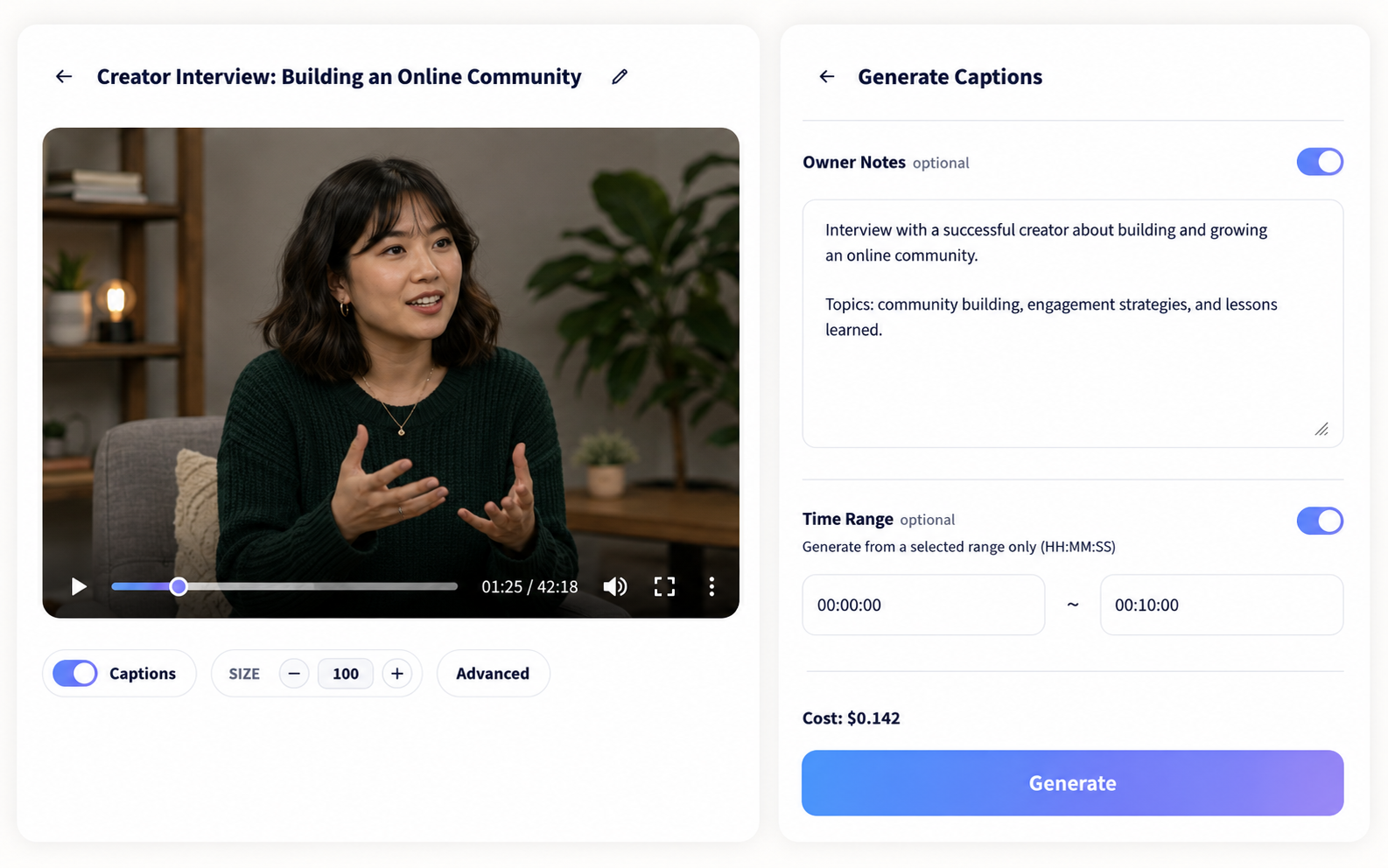
Add a video or audio file, optionally choose a time range or provide context, and let Captionate detect the spoken language and create editable, time-aligned captions.
Video or audio Automatic detection Word-level timing
Video selected with caption generation notes and time range settings
02 Review and adapt

Shape the caption version

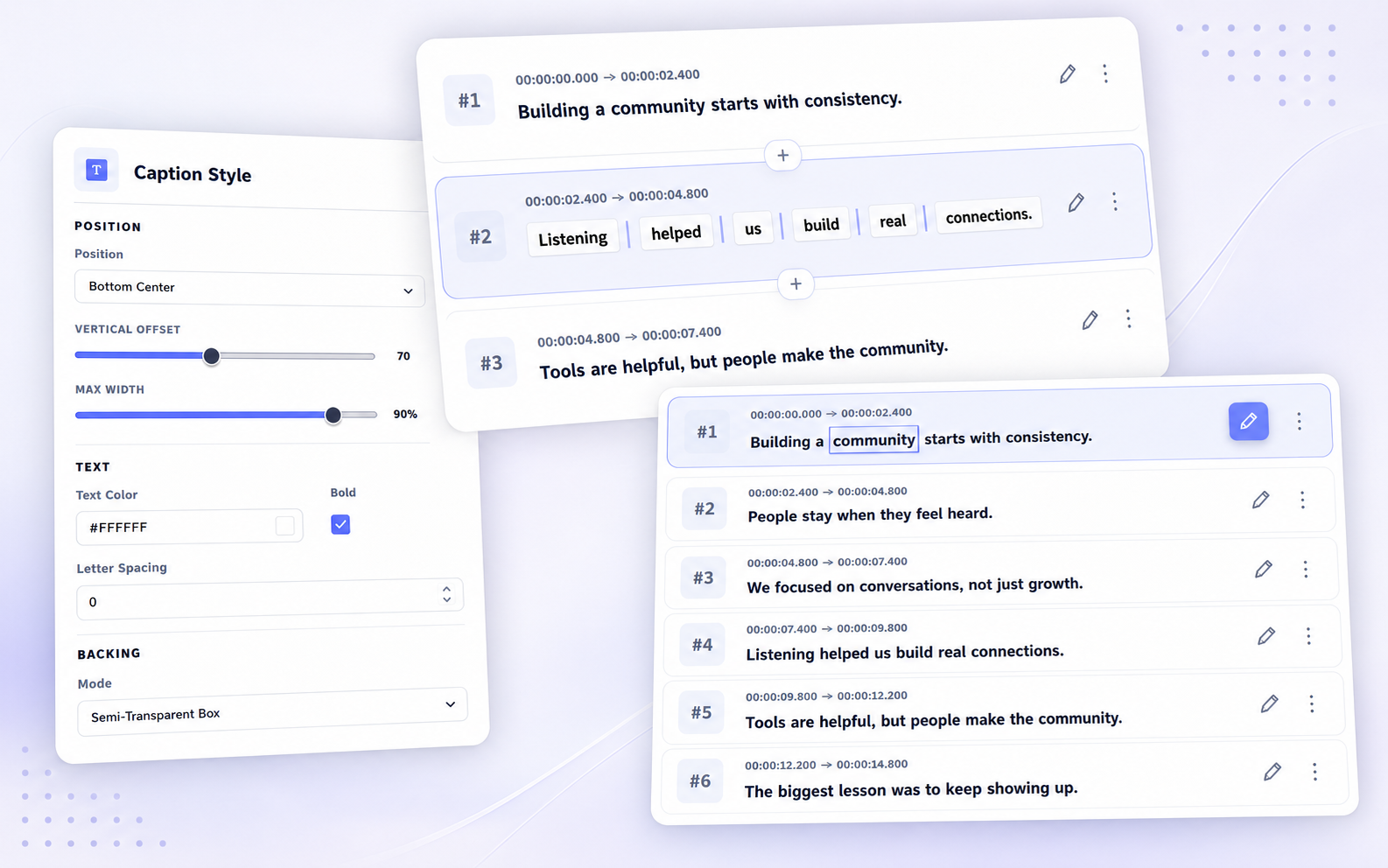
Correct individual words, split or merge segments, translate with custom instructions, and preview subtitle styling in the editor.

Edit Translate Style
Caption text editing, segment splitting and merging, and subtitle style controls
03 Delivery

Export the result

Download the open caption version as SRT, VTT, ASS, or TXT, or render styled captions directly into the video.

Caption files Rendered video
Export dialog with rendered video and subtitle file options
Why Captionate

Less cleanup between upload and publish.

Captionate combines accurate transcription, context-aware refinement, and word-level editing in one caption workflow.

01Context

Context-aware transcription

Names, terminology, and obvious recognition errors are refined using the surrounding transcript and media context.

02Boundaries

Captions shaped around speech

Speaker changes, punctuation, and language-specific boundaries turn raw transcripts into readable caption segments.

03Timing

Word-level timing control

Split, merge, and edit around individual words while keeping their timestamps connected to the audio.

04Languages

Built for multilingual media

Keep mixed-language speech intact, translate the caption version you choose, and continue editing without rebuilding timing.

05Direction

Custom translation instructions

Set the tone, preferred terminology, and phrasing so each translation fits its audience and purpose.

Built for real media

One caption workflow for the content you already make.

Generate, edit, translate, and deliver captions without switching tools or rebuilding timing.

01

Creators and social video

Create accurate captions, adjust subtitle styling, and export a captioned video ready for publishing.

Video captions
02

Interviews and podcasts

Turn long conversations into readable, time-aligned subtitles while preserving speaker and language changes.

Audio transcription
03

Courses and presentations

Use project context to preserve names and terminology, then refine every caption in the editor.

Accessible subtitles
04

Multilingual teams

Keep mixed-language speech intact and guide natural caption translation with your own terminology and tone.

Caption translation
Flexible by default

Bring the media you have. Leave with the format you need.

Spoken languages are detected automatically, common audio and video files are accepted, and every caption version stays editable before export.

60+
Transcription languages and variants
Auto
Language detection, including multilingual speech
4
Subtitle formats: SRT, VTT, ASS, and TXT
MP4
Rendered video with styled captions
Simple pricing

Pay for the work, not a subscription.

No monthly plan or seat fee. Review the cost before each job begins.

Generate

Caption generation

$0.36per media hour

Includes transcription, cleanup, segmentation, timestamps, and editable caption output.

Translate

Caption translation

$0.21per average media hour

Based on an average transcript of 300 source tokens per minute. Cost follows the text processed.

See full pricing and token rates
Questions

What to know before your first caption.

Do I need an account to try Captionate?

No. You can test caption generation with guest credits before signing up.

Does Captionate detect the spoken language automatically?

Yes. Caption generation detects supported languages automatically and can preserve language changes within multilingual media.

Can I correct captions after they are generated?

Yes. Edit individual words, split or merge caption segments, adjust styling, and keep each change in the same project.

Can I give instructions for a translation?

Yes. Add guidance for tone, terminology, names, and phrasing before translating a caption version.

Which caption files can I download?

Export the caption open in the editor as SRT, VTT, ASS, or TXT. You can also render styled captions directly into an MP4 video.

Start with your own media

Turn one file into captions you can publish.

Try the complete workflow free, with no sign-up required.

Choose a file