AI Gaming Video Editor

Turn raw gameplay into videos people actually want to watch.

Cut the run-up and the dead air, keep the tension in a close fight, and punch in on the reaction. Every cut stays editable.

  • Tension-aware cuts
  • Reaction punch-ins
  • Editable captions
clutch-take-02.mp43 requests · 1 constraint
Raw · 13.7s · tension keptCuts, punch-in, and captions stay editable

Cut the quiet, keep the tension.

A silence remover deletes every quiet gap. This keeps the ones that carry the moment and removes only the run-up and the hold.

1.5s
Trimmed from the run-up and tail
0s
Removed from the fight itself
1.67s
Silence kept before the punchline
1
Reaction punch-in

What a request changes

Two silences. Two different decisions.

01 / 05

Keep the pause, cut the run-up

Both gaps are about the same length. One is dead air before the moment; the other is the joke. Switch between the two treatments and watch the punchline survive or die.

SilencesLead-in cut · pause kept

Measured lead-in 1.11s (cut) · pause 1.67s (kept) · tail 0.54s (trimmed)
02 / 05

Never cut the fight itself

The reload, the low-health beats, and the near-death moment stay exactly where they are. Only the quiet lead-in and the trailing hold leave the clip.

TensionFight intact · 0s removed

Kept beats reload · second fight · near death · survival payoff

03 / 05

Punch in on the reaction

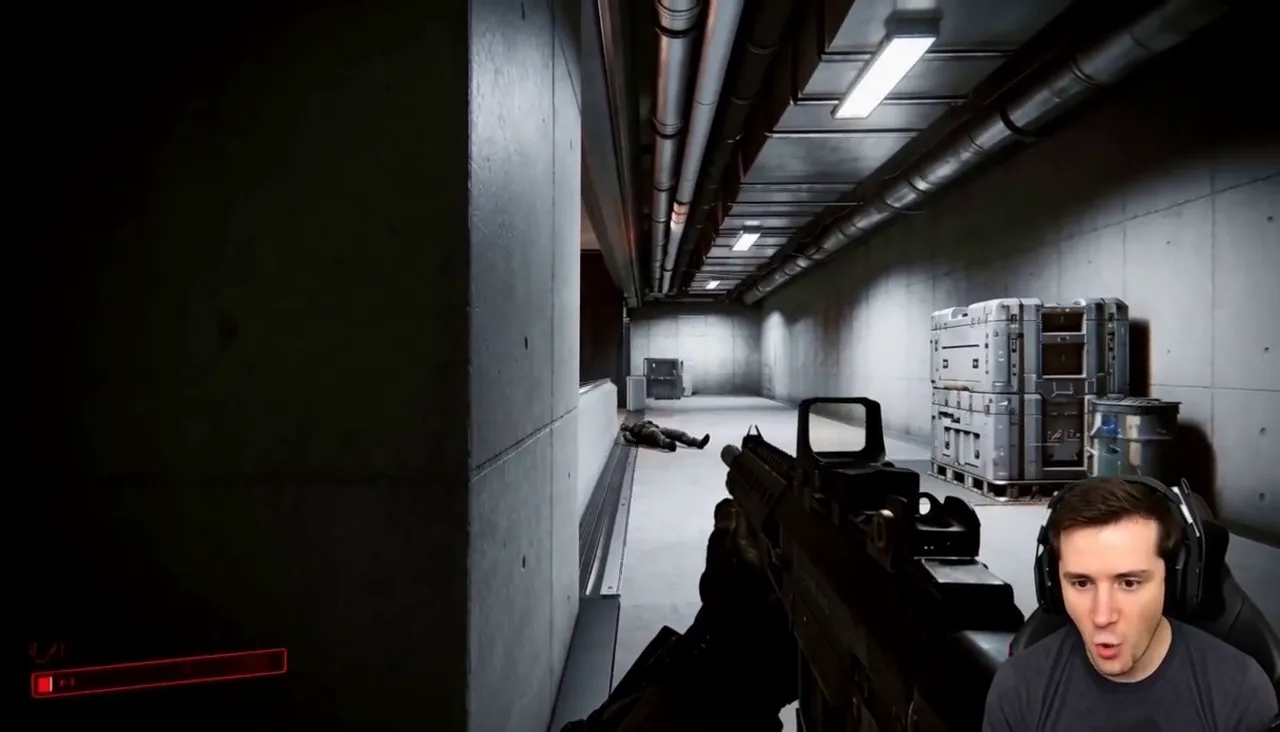
Ask for the reaction to land and the webcam corner scales up at that moment, with the gameplay still visible behind it.

Punch-inWebcam · 1.4× · 1.1s

Anchor bottom-right webcam

Gameplay stays in frame

04 / 05

Caption the payoff line

One caption on the shout, not text over the whole clip. The line stays editable after it lands.

Caption1 line · 1.1s

Editable copy · position · start · duration

05 / 05

Put a cut moment back

The first pass treated both silences the same and killed the joke. One follow-up restores the pause, and nothing else in the clip moves.

Follow-upPause cut · joke flat
You

Cut every quiet gap so it moves faster.

2 gaps removed8.0s → 4.7s
You · follow-up

Put the pause before “Panic is a skill” back. The joke is the pause.

Requested changePause restored · cuts unchanged · audio unchanged
  • This request · 1.67s pause restored
  • Cuts · lead-in and tail, unchanged
  • Audio · unchanged
  • Caption · unchanged

Source to result

One session, three moments, one finished clip.

  1. 01Raw gameplay momentsClutch · team joke · callback
  2. 02Tension-aware cutsRun-up and tail only
  3. 03Punch-in and captionReaction and payoff line
  4. 04Follow-up correctionRestore what matters
  5. 05Finished clipStill editable after export

Editing decisions

Four calls that make gameplay watchable.

Keep the pause

A quiet beat before a punchline is content, not dead air.

Punch in on the reaction

The webcam grows; the gameplay stays behind it.

NO WAY

Caption the line

One captioned shout lands harder than text on everything.

Trim the run-up

The quiet walk-in goes; the fight is untouched.

Gaming workflow

Edit gameplay with AI instead of scrubbing the whole session.

Cut dead time without cutting the tension

Quiet gaps are not all the same. A quiet walk-in before a fight is dead air, while the pause before a punchline is the joke. Captionate keeps quiet moments that carry tension or set up a payoff, and removes the run-up and the trailing hold.

Punch in on the reaction

Ask for the reaction to land and the webcam corner scales up at that moment, while the gameplay stays visible behind it. The punch-in has its own start and end you can adjust.

Caption and highlight one moment

A single caption on the shout, a highlight on the last kill, and nothing over the rest of the clip. The line, position, and timing stay editable after the request.

Fix an over-cut with a follow-up

If the edit moves too fast and a beat that mattered disappears, ask for it back in a sentence. The pause returns without changing the cuts, audio, or captions around it.

Work from the gameplay you already recorded

Captionate edits the footage you already have. Capture stays in your streaming software, and the original recording is never overwritten.

Export the clip for the platforms you post on

Render the finished clip as an MP4, or hand the same edit to a vertical version for Shorts and TikTok. Format choices stay separate from the editing decisions.

How it works

From raw capture to a clip people finish.

  1. Bring in the gameplay

    Upload the recording. The original file is not cut or overwritten.

  2. Describe the edit

    Say what to trim, what to keep, where to punch in, and what to caption.

  3. Review the timeline

    See which moments were removed and which were kept before you judge the result.

  4. Refine with a follow-up

    Ask for a cut moment back, or move the punch-in a beat later.

  5. Export the clip

    Render the finished video, or keep editing. Every cut stays adjustable.

FAQ

Gaming editing questions.

Can I edit gaming videos with AI?

Yes. You describe the edit in a sentence and Captionate applies it to the gameplay as real cuts, punch-ins, and captions on the timeline.

How is this different from removing silence?

Silence removal cuts every quiet gap. Captionate keeps quiet moments that carry tension or set up a joke, and removes only the run-up and dead air around them.

Will it cut the tension out of a close fight?

The fight itself stays intact. The reload, the low-health moments, and the near-death beat are kept, while the quiet lead-in and the trailing hold are trimmed.

Can it zoom in on the streamer reaction?

Yes. A punch-in can be added on the webcam corner at the reaction moment while the gameplay stays visible in the frame.

Can I undo a cut the AI made?

Yes. A follow-up request restores a removed moment, such as the pause before a punchline, without changing the rest of the edit.

Does it record my gameplay?

No. Captionate edits footage you already have. Capture and recording stay in your streaming or capture software.

Start with the session you already recorded

Cut the quiet. Keep the tension.

Describe the edit, check what left the timeline, and ask for anything back.

Edit gameplay